Knowledge base Identity
Device security
End-to-end encryption protects a message in transit. This page is about the other half: the key sitting on your device, and getting rid of it in a hurry.
For the transit half — including the optional quantum-resistant encryption for private messages and group chats — see those pages instead.
Identity encryption
By default a saved private key sits in the device's local storage in the clear. Anyone who can read that storage — an unlocked device, a forensic tool, a browser profile copied off a shared machine — can read the key and become you.
Identity Encryption, under Settings › Privacy & Security, closes that hole. With it on:
- your
nsecis encrypted at rest with AES-GCM-256; - the ephemeral secret keys your group chats rely on are encrypted under the same vault key;
- the plaintext key is never written to disk while encryption is on — it exists only in memory, only for the session;
- unlocking happens once, when the app starts.
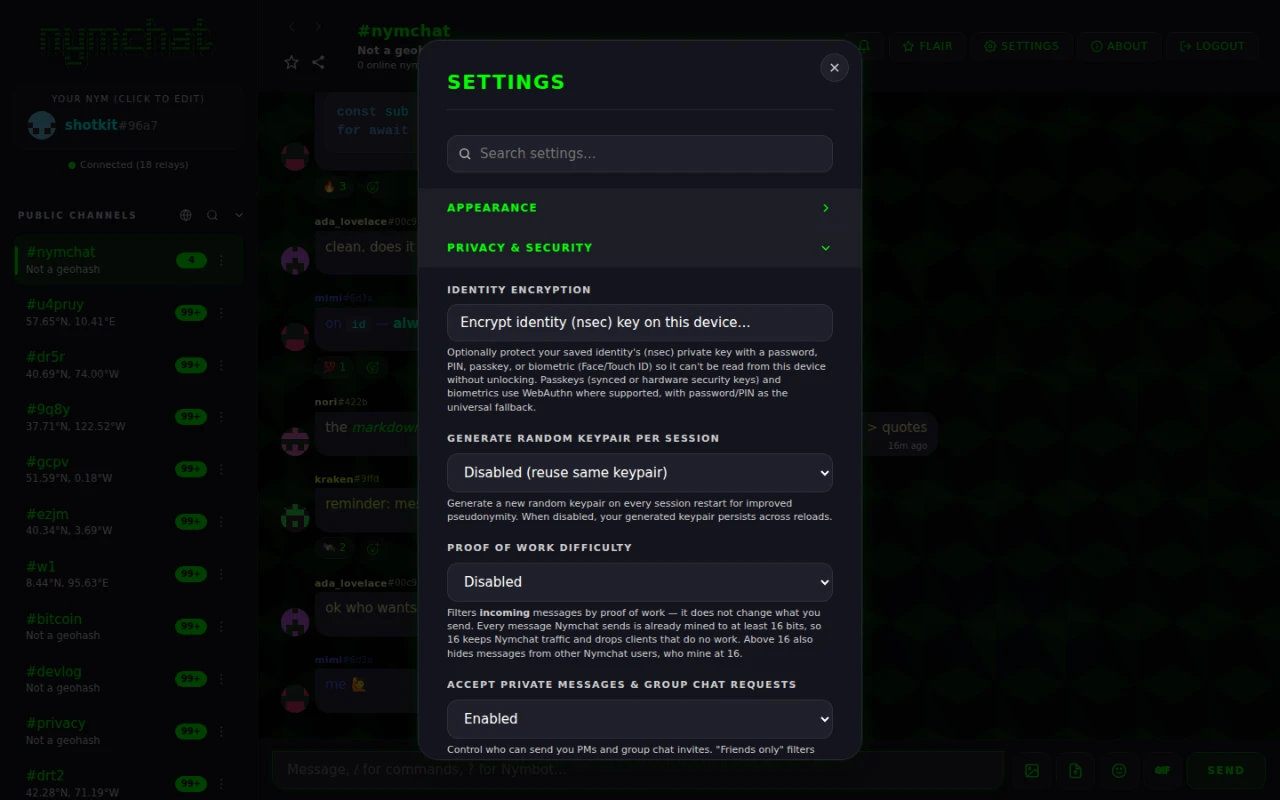
The unlock factor and the encrypted key are local to a device, so identity encryption is enabled per device. Only a non-sensitive on/off preference travels between devices, so a new device can offer to set it up too. No password, salt or credential is ever synced.
Choosing an unlock factor
You pick how the vault is unlocked on this device:
| Factor | How the key is derived | Available on |
|---|---|---|
| Password | PBKDF2-SHA256, 310 000 iterations | Everywhere |
| PIN | The same PBKDF2 derivation, digits only | Everywhere |
| Passkey | WebAuthn with the PRF extension, then HKDF-SHA256 | Web app |
| Biometric — Face ID, Touch ID, Windows Hello, Android biometrics, a hardware security key | WebAuthn PRF on the web; the platform's own biometric prompt on Android and iOS | Everywhere |
A PIN is a password made of digits, so treat a short one as exactly that: quick, and weak.
Not every authenticator implements the WebAuthn PRF extension, and one that does not cannot derive a key. So the moment you enable encryption the app makes you unlock once, there and then — better to find out immediately than the next time you open the app with no way back in.
Panic wipe
Press and hold the "Your Nym" panel for two seconds. Nymchat destroys every trace of itself on the device, for every identity saved on it. There is no confirmation dialog, on purpose — the point is that it can be triggered fast, under pressure, without a second screen to get through.
The same hold works on the unlock screen of an encrypted identity: hold the Nymchat wordmark at the top for two seconds and the device is wiped without unlocking anything first.
A short animation shows the progress while it:
- asks the Nymchat server to delete what it holds for each saved identity — synced settings, the archived copies of private messages and group chats, and the stored profile — with each request signed by that identity's own key. This step gets at most 3 seconds; the wipe never waits longer on the network;
- drops the private keys and the vault key from memory;
- encrypts every local- and session-storage value under a fresh random key that is immediately discarded, then overwrites those values with junk and clears the stores;
- overwrites and deletes every IndexedDB database, including the store that holds your other saved identities;
- empties the cache storage and unregisters the service worker;
- clears cookies, then reloads to a pristine first-run state.
Step three is the interesting one. Deleting data does not necessarily make it unrecoverable, so the app encrypts it first under a key nobody — including the app — keeps. Whatever survives the delete is ciphertext with no key in existence.
Step one only reaches identities whose key the app can use at that moment: the active one, and saved ones whose key is on the device unencrypted, or in a browser extension that answers for it. An identity that is still locked behind identity encryption, or that signs through a remote signer while it is not active, cannot sign the request, so its server records stay. If any were skipped, the progress screen says how many. The local wipe of the device happens either way.
A wiped identity is not recoverable, by you or by anyone. If a nym is one you want to
keep, back up its nsec and its nympq1… recovery code
before you ever need this. A normal single tap on that panel just opens the nym editor,
so a wipe does not happen by accident.
The wipe clears this device and Nymchat's own server. It cannot delete what relays already hold: your channel messages and the encrypted gift wraps of your private messages stay wherever relays keep them, and so do the copies on the other people's devices.
Wiping your other devices too
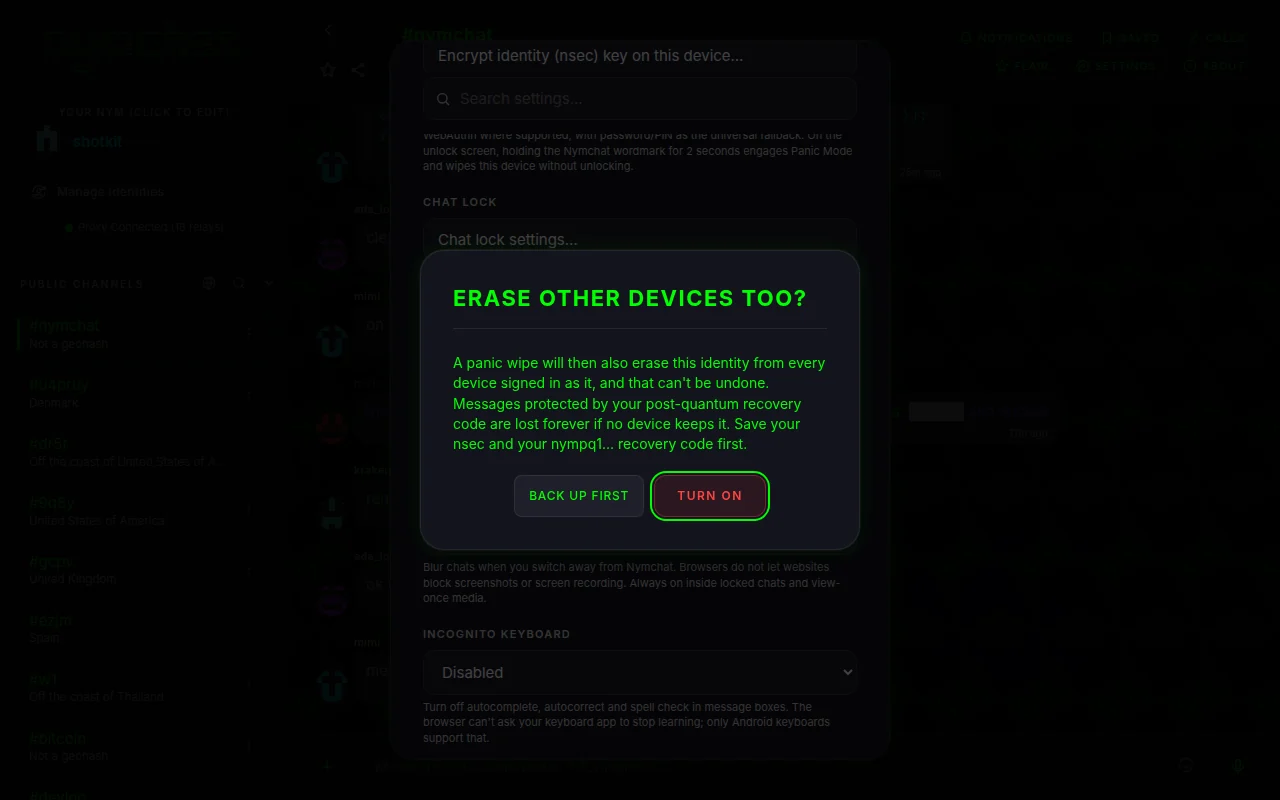
Panic wipe also erases my other devices, under Settings › Privacy & Security, is off by default and is set per identity. It syncs with the identity's settings, so every device signed in as it knows it is on. Turning it on asks you to confirm, and offers to back up your keys first.
With it on, a panic on any device does two more things before the purge, signed by the identity: it leaves a small marker on the Nymchat server, and sends the same marker to the identity itself as an encrypted gift wrap on the relays. Every other device signed in as that identity checks for the marker when it connects, when it comes back to the foreground and every five minutes. A device that finds a validly signed marker newer than its own login wipes that identity and removes it, with no prompt. Other identities saved on that device are not touched.
- A forged marker is ignored: it has to carry the identity's own signature.
- Logging in again afterward stamps a new login time and clears the marker, so the fresh login is not wiped. A device that stays offline until after that re-login can miss the signal.
- The marker is kept for 90 days, and holds the identity's public key, a time and a signature — nothing about which devices exist.
- It does not travel over the Bluetooth mesh.
- An encrypted identity that is still locked when you panic from the unlock screen cannot sign, so it cannot send this signal.
Chat lock, screen security and incognito keyboard
Three settings under Settings › Privacy & Security for the person who picks up your unlocked phone, or looks over your shoulder.
Chat lock. Lock chat, in the menu of a conversation's row, moves it
out of the main list into Locked chats, which open only after Face ID,
a fingerprint, a passkey or a passcode. A device with none of those asks you to set a
passcode, kept on that device; with identity encryption on, its password or PIN unlocks too.
Up to 100 chats can be locked, though not #nymchat. A locked chat's
notifications say only “New message”. Chat lock settings… sets
how soon they lock again after you leave the app, and can hide the Locked chats entry
altogether, so that it opens only when you type a secret code into a sidebar search. Which
chats are locked syncs to your other devices; each device unlocks on its own.
Screen Security, off by default, does what the platform allows. On Android it hides chats in the app switcher and blocks screenshots and screen recording. On iOS it hides chats in the app switcher and covers them while the screen is recorded or mirrored; iOS does not let apps block screenshots. In a browser it blurs chats when you switch away; browsers do not let websites block screenshots or recording. It is always on inside locked chats and view-once media.
Incognito Keyboard, off by default. On Android it asks the keyboard not to learn from what you type and turns off suggestions and autocorrect in message boxes. In a browser it turns off autocomplete, autocorrect and spell check, but a website cannot ask your keyboard app to stop learning. iOS gives apps no such switch, so the setting is unavailable there.
What is stored on your device
Nymchat keeps state locally so it can open instantly and work offline. Broadly:
| What | Notes |
|---|---|
| Your keypair | Encrypted at rest when identity encryption is on. Not stored at all in per-session or hardcore mode. |
| Other saved identities | Each identity in Manage Identities keeps its own key, settings, caches and queued messages, apart from the others. Only the active one is loaded. |
| Saved messages, locked and pinned chats | Lists of what you saved, locked and pinned. Saved messages hold a copy of the text. |
| Settings and preferences | Theme, layout, blocked users and keywords, favorite channels, and the rest. |
| Channel history and profiles | A cache of what has been fetched from relays. |
| Decrypted private messages and group chats | Controlled by Cache PMs & Group Chats On Device (on by default). Turn it off and they are re-fetched and decrypted each launch instead of sitting on disk. |
| Group membership and ephemeral group keys | Encrypted under the vault key when identity encryption is on. |
| Flair purchases | Recoverable from a redeem code — see the flair shop. |
Settings › Data & Backup has two narrower tools than the panic wipe: Clear Local Storage Cache drops cached history, messages, profiles and reactions but keeps your login, settings, group memberships and purchases; Reset Settings to Defaults does the reverse.
Deleting your account
Delete account data and wipe device, at the end of Settings › Data & Backup, deletes your account from inside the app. It asks once, then, for every identity saved on the device whose key it can use, asks Nymchat's server to delete everything it keeps for that identity: synced settings and the post-quantum recovery code, the profile, the PM and group archive, Nymbot conversations, scheduled messages, the server's copy of your public posts, your Nymbot credit balance with its ledger, purchase, invoice and voucher records, reports you filed, and the spam-filter and app-check records about you. Each request is signed by that identity's own key and sent on its own, a few seconds apart. Then it wipes the device the same way as the panic wipe and shows Account data deleted before returning to first run.
Before each identity's server data is deleted, the app also stores a small marker signed by that identity: its public key, a time, an event id and the signature, nothing else, kept for 90 days. This happens whether or not Panic wipe also erases my other devices is on. Every other device signed in to that identity checks for it when it connects, comes back to the foreground, and every few minutes, and wipes that identity instead of uploading its data again. Other identities on those devices are not touched.
On iPhone and iPad it also deletes the key backups this device saved to iCloud. Backups in Google Drive, and iCloud backups saved from somewhere else, stay where they are.
Any remaining Nymbot credits are deleted with the account and cannot be restored, in
Nymchat or in the Nymbot app. Use ?transfer first if you want to keep them.
Posts and messages already on public Nostr relays are kept by the relay operators and cannot be deleted by us.