Knowledge base Talking to people
Channels
Public rooms with no owner, no membership list and no moderator. Anyone can join any channel, and joining is just subscribing.
Two kinds of channel
Every channel is written #something. What that something is decides which kind it
is:
| Geohash channel | Named channel | |
|---|---|---|
| Looks like | #9q5, #u4pruy | #bitcoin, #nymchat |
| Means | A place | A subject |
| Nostr event kind | 20000, tagged ['g', geohash] | 23333, tagged ['d', channel] |
Both are ephemeral Nostr events: relays are expected to hold them for a while and drop them, not to archive them forever. Both are also entirely public — unencrypted events that anyone with the relay address can read.
Nothing you send to a channel is encrypted, and there is no server you can ask to delete it. Treat a channel post the way you would treat a public forum post that you cannot edit.
Geohash channels
A geohash encodes a latitude and longitude as a short string, where each extra character narrows the area:
| Example | Length | Roughly covers |
|---|---|---|
#9 | 1 | A large slice of a continent |
#9q | 2 | A region |
#9q5 | 3 | A metropolitan area |
#9q5ct | 5–6 | A neighborhood, then a few streets |
So #9q5 is "people around Los Angeles" and #9q5ctr is a specific
corner of it. Shorter prefixes are busier; longer ones are quieter and much more revealing
about where you are. This is the same channel scheme
Bitchat uses, which is part
of how the two apps meet.
Posting in a six-character geohash channel tells everyone reading roughly which few streets you are on. If that matters, use a shorter prefix or a named channel.
Named channels
Anything that is not a valid geohash is a named channel: #bitcoin,
#nymchat, #whatever-you-like. Type /join #newthing and
if nobody is there, you have made it. There is no registration and no owner — a named
channel is simply a tag that clients agree to subscribe to.
Favorites, sorting and sharing
The channel list has a context menu (the ⋮ on each row) and a header row with search and the globe. From there you can:
- Favorite a channel to pin it to the top of the list.
- Hide a channel you do not want to see, or block it outright — see Blocking people and channels.
- Share it:
/shareproduces a link that opens the channel directly.
Four settings shape the list itself, under Settings › Channels:
| Setting | Default | Effect |
|---|---|---|
| Group Chats & PMs Only Mode | Off | Hides geohash channels entirely and skips their subscriptions, which also cuts bandwidth. |
| Sort Geohash Channels by Proximity | Off | Orders them by distance from you. Needs location permission. |
| Default Landing Channel | None | The channel to open on launch. |
| Hide All Non-Favorited Channels | Off | Shows only what you have favorited. |
The geohash explorer
The globe icon above the channel list opens a world map of where people are actually talking.
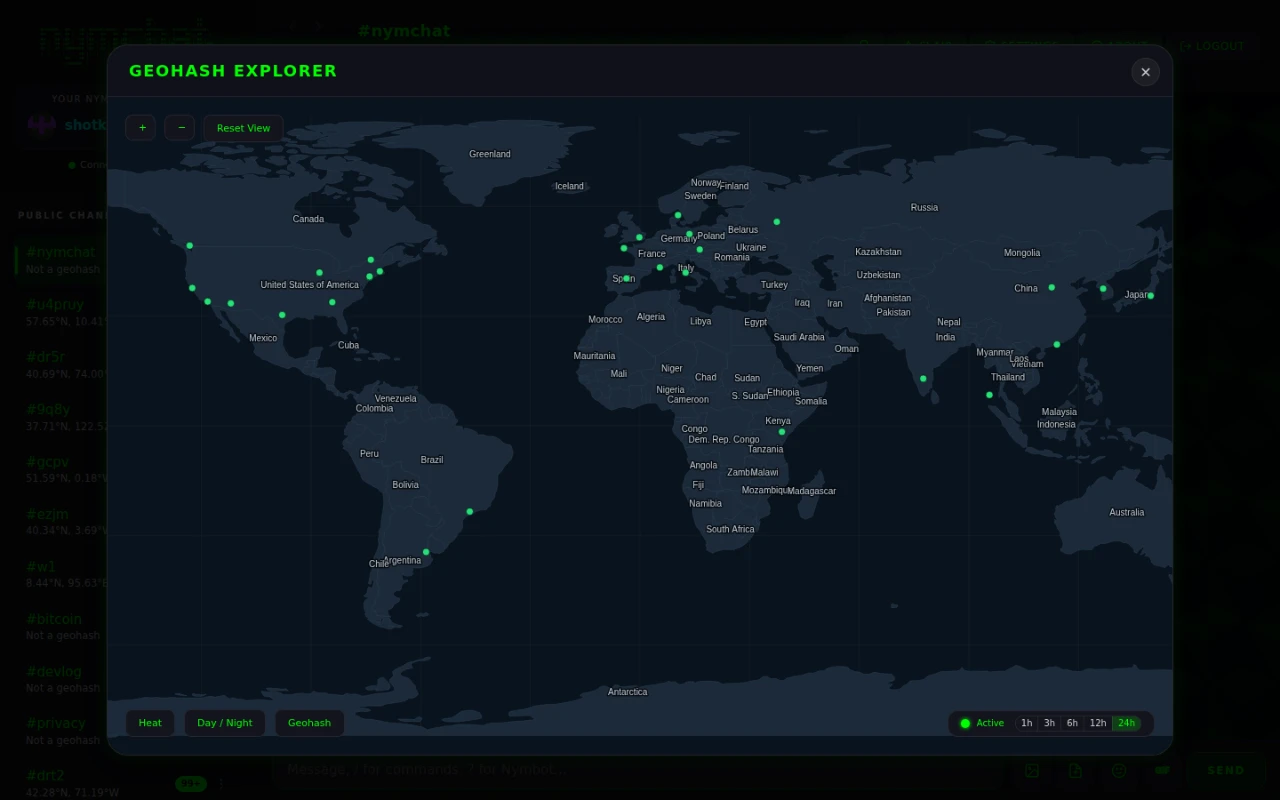
Pan and zoom, and country outlines give way to regions and then cities as you go in. Tap a dot and a panel tells you what the channel is, with a Join button. The controls are:
- Heat — shade the map by activity instead of plotting single dots.
- Day / Night — overlay the current terminator, so you can see who is awake.
- Geohash — draw the geohash grid at a precision matched to the zoom level, which is the quickest way to see what a prefix actually covers.
- A time filter — 1h, 3h, 6h, 12h or 24h — for how far back "active" reaches.