Knowledge base Talking to people
Messages
The composer, the formatting it understands, and everything you can do to a message once it has been sent. This applies equally in channels, private messages and group chats unless a section says otherwise.
The composer
The box along the bottom. While it is empty it holds only the emoji button, with + to its left and the microphone to its right. Start typing and the three pull together into one pill: + at one end, the paper-plane Send button at the other, and the formatting toolbar opens above the text by itself. Clear the text and the composer goes back to its resting shape.
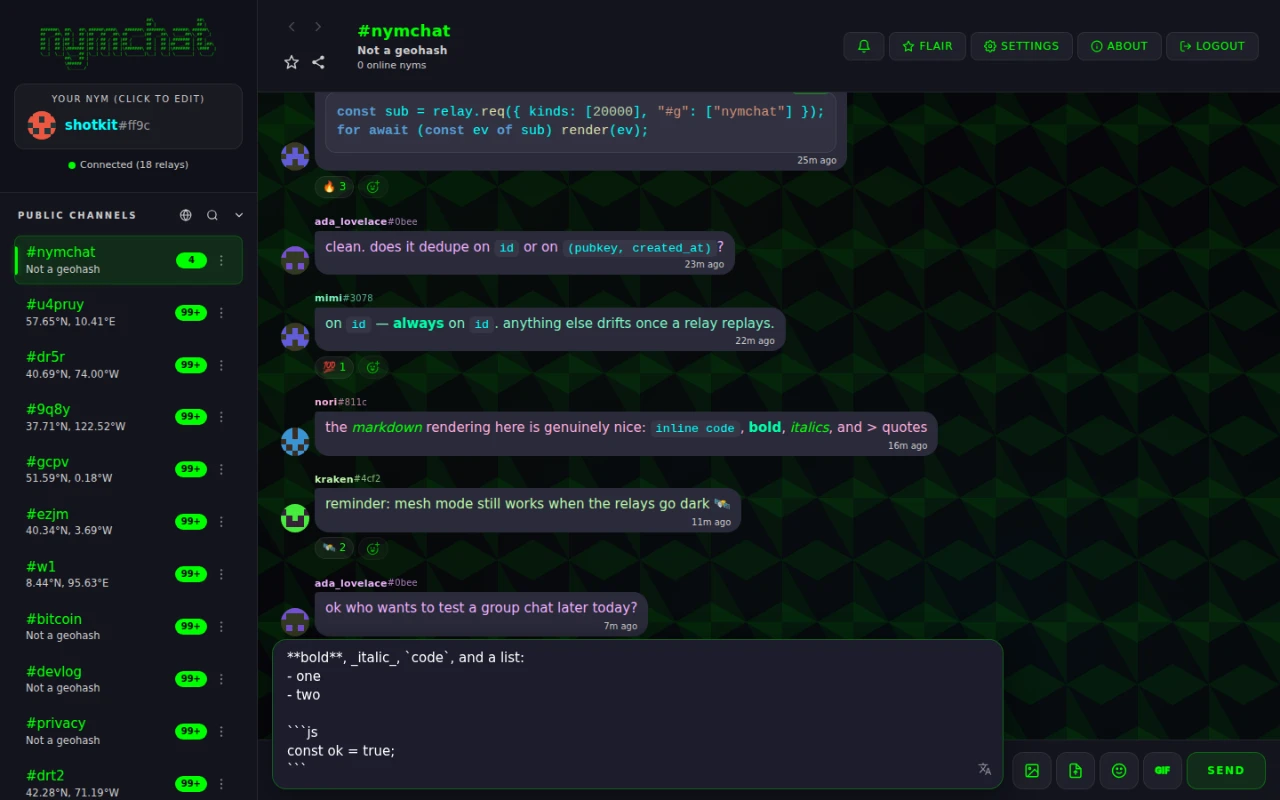
Enter sends and Shift+Enter starts a new line. The toolbar leads with the emoji and GIF
picker and the translate button, then a divider, then the formatting buttons: bold, italic,
underline, strikethrough, spoiler, inline code, code block, quote, subtext, timestamp, and three
heading sizes.
On a keyboard, Ctrl or ⌘ with B, I, U or
E applies bold, italic, underline or inline code, and Ctrl+Shift+X strikes
through.
The translate button translates what you have typed, before you send it, into a language you pick from its list. Like translating a received message, the text is sent to a translation service to do it.
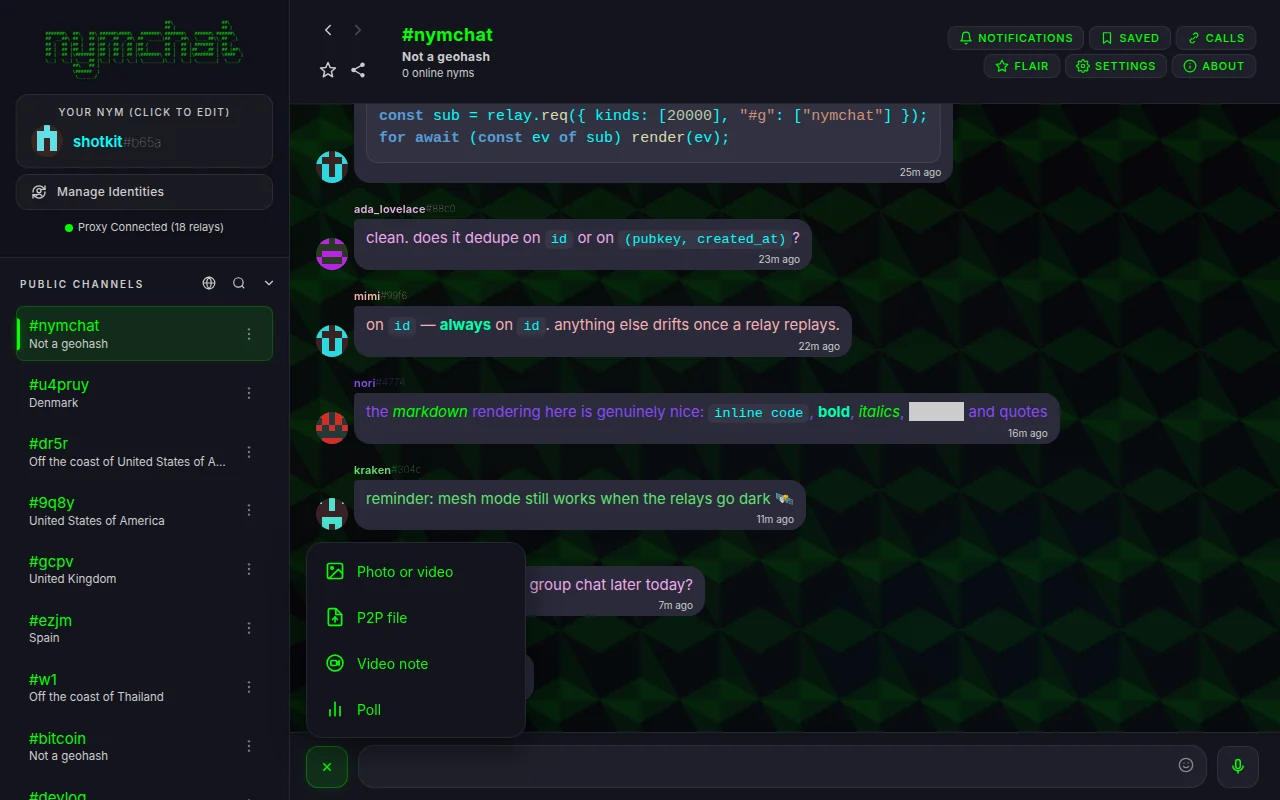
+ opens the attach menu:
| Item | Where | What it sends |
|---|---|---|
| Photo or video | Everywhere | An uploaded picture or video — see Images, video and files. |
| P2P file | Everywhere | A file sent straight to the other device. |
| Location | Private messages and groups | Your location, once or live — see Sharing a location. |
| Video note | Everywhere | A short round video — see Voice messages and video notes. |
| Poll | Everywhere except the Nymbot chat | A poll. |
| Event | Group chats | An event members can RSVP to. |
The small arrow beside the paper plane opens the send options: Send later, and in a public channel Send anonymously. Both are covered under Sending later or anonymously.
Three prefixes change what typing does:
| Type | And you get |
|---|---|
/ | A command, with an autocomplete list — see the command reference. |
? | Nymbot. |
@ | A mention picker of people in the conversation. |
Formatting
Messages use Discord-style Markdown. What is supported:
| You type | You get | Command |
|---|---|---|
**bold** | Bold | /bold, /b |
*italic* or _italic_ | Italic | /italic, /i |
__underlined__ | Underline | /underline, /u |
~~struck~~ | Strikethrough | /strike, /s |
||hidden|| | A spoiler, blacked out until someone taps it | /spoiler |
`code` | Inline code | /code, /c |
| Three backticks around a block | A code block, syntax-highlighted, with a Copy button | /code |
> quoted | A block quote | /quote, /q |
#, ##, ### at the start of a line | Headings | — |
-# at the start of a line | Subtext: a small, dimmed line | /subtext |
-, * or 1. at the start of a line | A bulleted or numbered list; indent to nest | — |
<t:1767225600:F> | A timestamp, shown in each reader's own time zone and language | /timestamp |
The timestamp button in the toolbar writes the <t:…> code for you
from a date and time picker. The letter after the second colon picks the style:
t and T for a short or long time, d and
D for a short or long date, f (the default) and F for
date and time, and R for a relative “in 3 hours”.
Links are detected automatically. A link to an image or a video becomes an inline preview; a link to an audio file becomes a player; a link to an ordinary page gets a preview card.
A spoiler only covers text on screen. It is sent as plain text with the bars around it, so in a public channel anyone reading the relays, or using another client, sees it uncovered.
Threads
Threads keep a discussion under the message that started it instead of scattering it through the conversation. Click or tap any message — or its reply count row, the thread button that appears on hover on desktop, or Reply in Thread on a long-press — and the view changes in place to that message's thread: the original on top, its replies underneath, and the same composer now replying into the thread.
The back and forward buttons in the header step in and out of threads the same way they move between conversations, and leaving a thread puts the conversation back exactly as it was. While threads are on, a reply lives only in its thread; the conversation shows the original message with a clickable reply count under its reactions row rather than every reply inline. This works the same in channels, private messages and group chats, and in both Single Chat and Column View.
On the wire, a channel thread reply is an ordinary channel message with a standard NIP-10 reply tag, and a private thread reply carries its marker inside the encrypted payload — other clients simply see a normal message. Message Threads under Settings › Appearance turns threads off and returns every reply to the classic flat view.
Replies and quotes
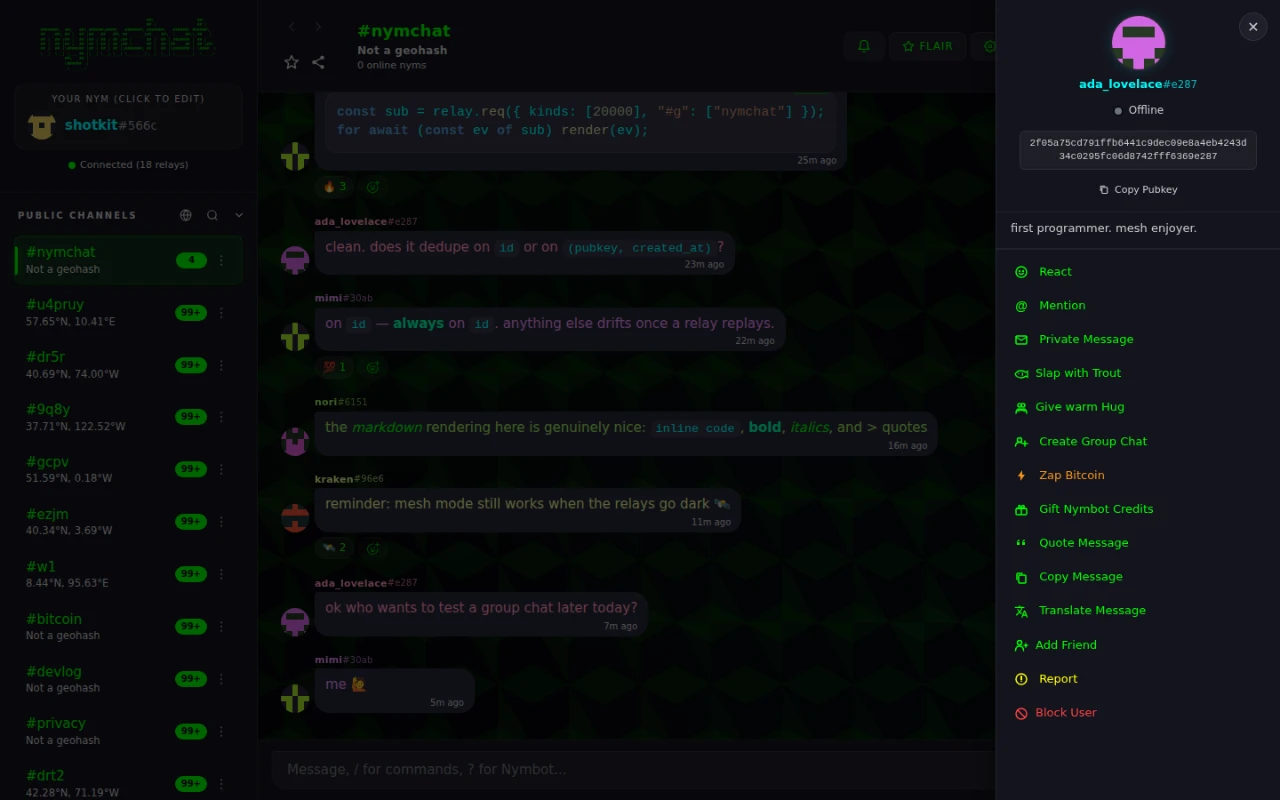
A quote is the other way to reply, and it travels inside the message itself. Pick Quote Message from a message's context menu — long-press on mobile, or a right-click on desktop — and your reply carries the original inside it. Tapping a quote jumps to the message it came from, even if that message is far up the history and not currently rendered.
Quote chains nest, which is also how you carry on a conversation with Nymbot: quote-reply to its answer and it keeps the thread's context.
Reply privately, in the context menu of someone else's message in a channel or a group, opens a private message with that person with their message already quoted. The reply goes only to them. Someone you know only from the Bluetooth mesh, with no linked Nostr identity, can be answered privately from the mobile apps but not from the web app.
Reactions and emoji
React from the same context menu, or from the small face button under a message that already
has reactions. Reactions are ordinary Nostr kind 7 events (NIP-25) and are
visible to everyone who can see the message.
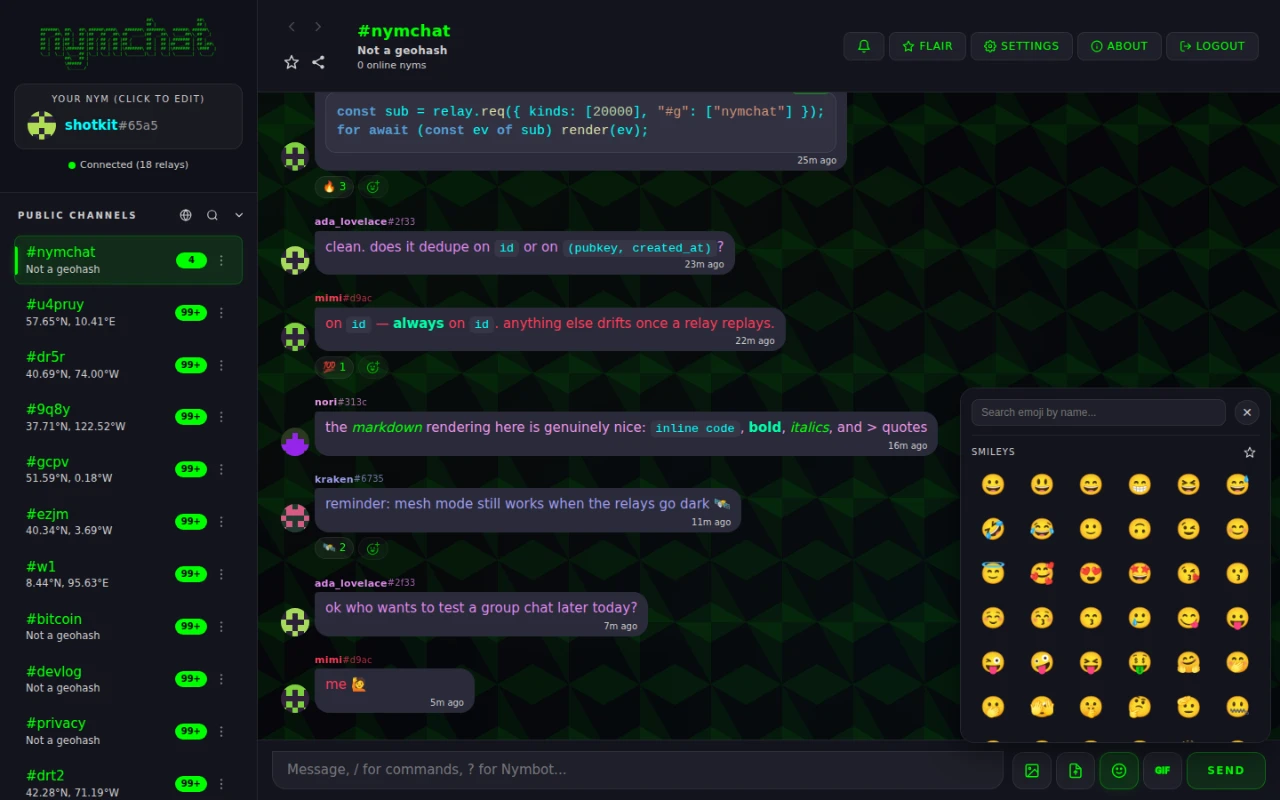
The emoji picker also carries custom emoji: Nymchat discovers NIP-30 emoji
packs and renders :shortcode: references from them, so a message from a client
using a pack you do not have still shows the right picture. The same picker has a GIF tab.
Voice messages and video notes
The microphone records a voice message. Hold it and talk, then let go to send. While holding, slide sideways to cancel, or slide up to lock the recording so you can take your finger off; a quick tap locks it too. A locked recording waits for you to send it or delete it. Voice messages run up to 5 minutes.
Video note, in the attach menu, records a short round video with sound, up to 60 seconds. It plays silently and on a loop in the conversation, and with sound when you tap it.
Both are uploaded and sent as a link, like a picture. A voice message is uploaded as an audio-only video file (MP4 or WebM, depending on the device), because some media hosts refuse audio files; it still plays as a voice message, with its waveform, in every Nymchat app. Another Nostr client sees a link to that file.
- Playback speed. The speed button on a voice message cycles 1×, 1.5× and 2×. The choice is remembered on the device.
- Transcription. The transcribe button turns a voice message into text on your device: the audio is never sent anywhere to do it. The first time, the device downloads a speech model for your language. A browser that can only transcribe by sending audio to a server is not used, so in that browser the button is unavailable. Transcripts are kept on the device, and Settings › Messaging & Display › Voice message transcription deletes them.
- Over the Bluetooth mesh, voice messages are capped at 20 seconds and 100 KB and arrive slowly. Video notes are too large for the mesh.
Images, video and files
Photo or video uploads a picture or a video and posts it as a link, which every client renders inline. Multiple images in one message are grouped into a gallery rather than stacked. Before you send, a bar under the preview offers two choices:
- HD. By default a photo is resized to at most 1,600 pixels on its long side and recompressed, and the bar shows the size both ways. HD sends the original file instead. Videos are always sent as they are.
- View once, in private messages and group chats only. The file is encrypted with a one-time key carried inside your encrypted message; the recipient's app opens it once and will not show it again after it is closed, and you see when it has been opened. Nymchat cannot stop a modified app, another device or a camera from keeping a copy, and says so when you turn it on. View-once media cannot be saved or exported.
P2P file is different: it sends the file directly to the other device over WebRTC, with WebTorrent for larger transfers, up to 2 GB. Nothing is uploaded to a host. See what a direct connection reveals — the same caveat applies.
Over the Bluetooth mesh, photos and files travel too, up to 100 KB each; photos are shrunk further to fit unless HD is on.
Blur Images from Others, under Settings › Privacy & Security, blurs incoming pictures until you tap them. It is on by default, and can be relaxed to friends-only or turned off. Your own images are never blurred.
Media, files & links, in the menu of a private message or a group chat, collects everything shared in the conversation on three tabs. It lists what is on this device, and can load older items from the archive. Spoilered media stays covered there too.
Sharing a location
Location, in the attach menu of a private message or group chat, sends a map card. Send your current position, pick a spot on a map, or share a live location for 15 minutes, 1 hour or 8 hours, which updates until it ends or you stop it. The card says how precise the position is.
A location is end-to-end encrypted like any other private message. It cannot be shared in a public channel. A one-to-one location can go over the Bluetooth mesh when the other person is in range; a group location needs the internet.
Polls
/poll, or Poll in the attach menu, opens the poll composer: a
question up to 280 characters and two to six options of 100 characters each. Results
update live as votes arrive.
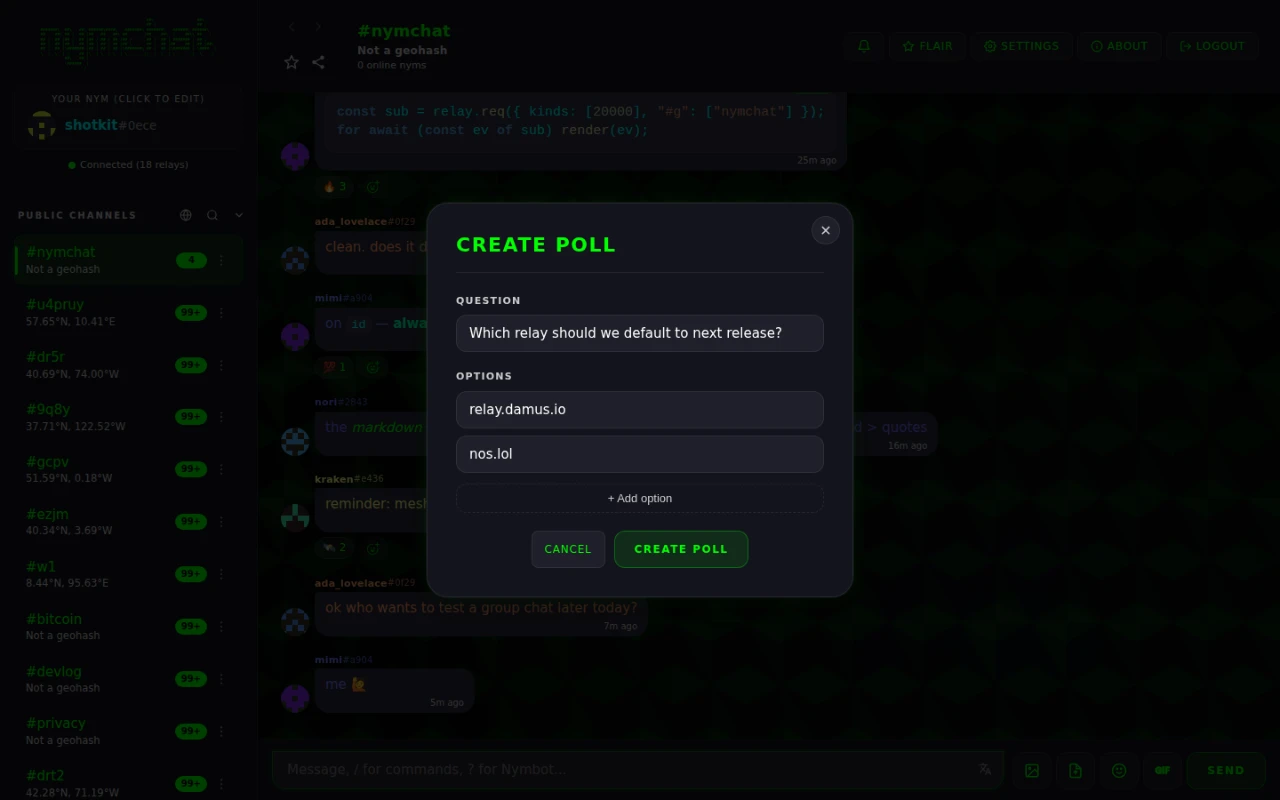
In a channel, a poll and its votes are public like every other channel message. In a private message or a group chat, the poll and each vote are end-to-end encrypted messages, so only the people in the conversation see them, and whoever started the poll can close it. Polls need the internet; they cannot be created over the Bluetooth mesh.
Editing and edit history
Pick Edit Message from the context menu of your own message, change it, and send. Only the author can edit a message. An edited message shows (edited); tap it for the edit history, every earlier version with its time.
An edit is a new event that points at the original. The original is still on the relays, and the edit history shows it to anyone who can see the message. In a channel that is everyone. If you posted something you should not have, editing it does not take it back.
Saved messages, keep in chat and export
Save message in the context menu puts a private copy of a message in Saved, the button in the header, with a link back to the original. You can keep up to 500. With a persistent identity the list is encrypted to your own key and syncs to your other devices; with a per-session or hardcore identity it stays on the device.
Keep in chat applies to disappearing messages in private messages and groups: a kept message is marked Kept and does not disappear when its timer runs out. Keeping or unkeeping is sent to the others in the conversation as an encrypted signal, and over the Bluetooth mesh when that is the only route.
Export chat, in the menu of a private message or a group chat, saves the conversation as a text transcript, or as a .zip with the transcript and any media already downloaded to the device. It exports what is on this device. View-once media is never included.
Sending later or anonymously
The arrow beside the paper plane opens two ways to send.
Send later schedules the message for a date and time, at least a minute and at most 30 days ahead. Your app signs the message straight away, dated at the chosen time, and for a private message or group also encrypts it, then hands that finished copy to the Nymchat server, which publishes it at the time. The server holds a message it cannot read or change. While anything is scheduled in a chat, a bar above the composer counts it; open it to send an item now, change its time or cancel it, from any of your devices. Send later needs the internet and the Nymchat server, not the Bluetooth mesh, and in private messages and groups it needs your key on the device rather than in a signer.
Send anonymously appears in public channels when you are logged in with a
Nostr account. The message is signed by a brand-new throwaway key with a random nym, so it is
not linked to your identity on the relays. If it asks Nymbot
something — a ? command, an @Nymbot mention, a quote of
Nymbot, or a reply in a thread Nymbot is in — Nymbot is asked as that throwaway nym and
answers in the channel. It does not work over the Bluetooth mesh.
The key is new, but the connection that delivers it is yours. A relay or the Nymchat proxy still sees the request come from your network address, at the moment you sent it. Use Tor or a VPN if that matters.
Unread messages, mentions and pinned chats
Open a conversation with unread messages and a New messages line marks where they start. While you are scrolled away from them, a button counts them — “5 new” — with an arrow pointing the way the jump will go, and tapping it takes you to the first one you have not seen. A separate @ button counts unread mentions of you and takes you to them.
Any chat can be pinned from the menu on its row in the sidebar, up to 10.
Pinned chats stay at the top of their list, in the order you set with Move up and Move
down, and with a persistent identity the pins sync to your other devices.
#nymchat is always first.
Translating a message
Pick Translate Message from a message's context menu and it is translated into your translation language, in place, with the original a tap away.
Set that language under Settings › Messaging & Display; it is Disabled by default, and there are around 45 languages to choose from. Messages are only translated when you ask.
Translation is a request to a machine-translation service through Nymchat's proxy, so the text of the message is sent to it. The same goes for the translate button in the composer, which sends your draft.
Read receipts, typing and away messages
Three signals tell other people something about you, and all three are yours to scope. The first two live under Settings › Privacy & Security and take the same five values: Enabled everywhere, Both PMs and group chats, Only PMs, Only group chats, or Disabled completely.
| Signal | Default | What it tells people |
|---|---|---|
| Read Receipts | Enabled everywhere | That you have read their message (✓✓). |
| Typing Indicators | Enabled everywhere | That you are typing right now. |
| Show Status Indicators | Enabled | Online, away or offline on your avatar. "Friends only" broadcasts a hidden status publicly and shares the real one privately with friends. |
For a deliberate away message, /brb lunch sets one that auto-replies while you are
gone, and /back clears it.