Knowledge base Identity
Identity and login
There is no account. There is a keypair on your device, and everything you do is signed with it.
Keys, not accounts
A Nostr identity is a secp256k1 keypair. The public key identifies you; the private key signs what you send. There is no registration step because there is nothing to register with — the key is generated locally and is valid the moment it exists.
Two encodings you will see:
| Form | What it is | Sharing it |
|---|---|---|
npub1… | Your public key | Safe. It is your address. |
nsec1… | Your private key | Never. It is you. |
nympq1… | Your post-quantum code | Never. It opens your quantum-resistant messages. |
Your nym is the display name you chose plus four hex characters taken from
your public key — SatoshiFan#a1b2. Names are not reserved and two people
can pick the same one; the suffix is what tells them apart, and it cannot be borrowed
without the key behind it.
Nobody holds a copy of your private key, so nobody can restore it. Lose it and the
identity is gone: not locked, gone. If an identity matters to you, copy its
nsec into a password manager now — and its nympq code
beside it. The nsec alone cannot rebuild the post-quantum code, which is
the whole point of it being separate, so the two are backed up together or not at
all.
Ephemeral identities
Sign up on the welcome screen and Nymchat mints a keypair for you on the spot. What happens to it next is a setting — Generate Random Keypair Per Session, under Settings › Privacy & Security:
| Mode | Behavior |
|---|---|
| Disabled (default) | The keypair persists across reloads, so your nym survives closing the tab and coming back. |
| Enabled | A brand-new identity every session. Nothing links this session to the last one. |
| Hardcore | A new keypair for every message sent. |
Nobody can reply to a pubkey that no longer exists. Private messages and group chats do not work reliably in hardcore mode, and settings will not sync. It is for shouting into a public channel and nothing else. Per-session mode has the same effect on settings sync, for the same reason.
There is also Auto Ephemeral Mode on Restart under Settings › Messaging & Display, which skips the welcome screen entirely and drops you straight into a fresh ephemeral session.
It hides you from other users: there is no name, email or phone number behind the key. It does not hide your IP address from the relays you connect to. Nymchat routes relay traffic through its own proxy by default, which keeps your address off third-party relays — see the privacy proxy — but if that matters to you, use Tor or a VPN as well.
Logging in with a Nostr account
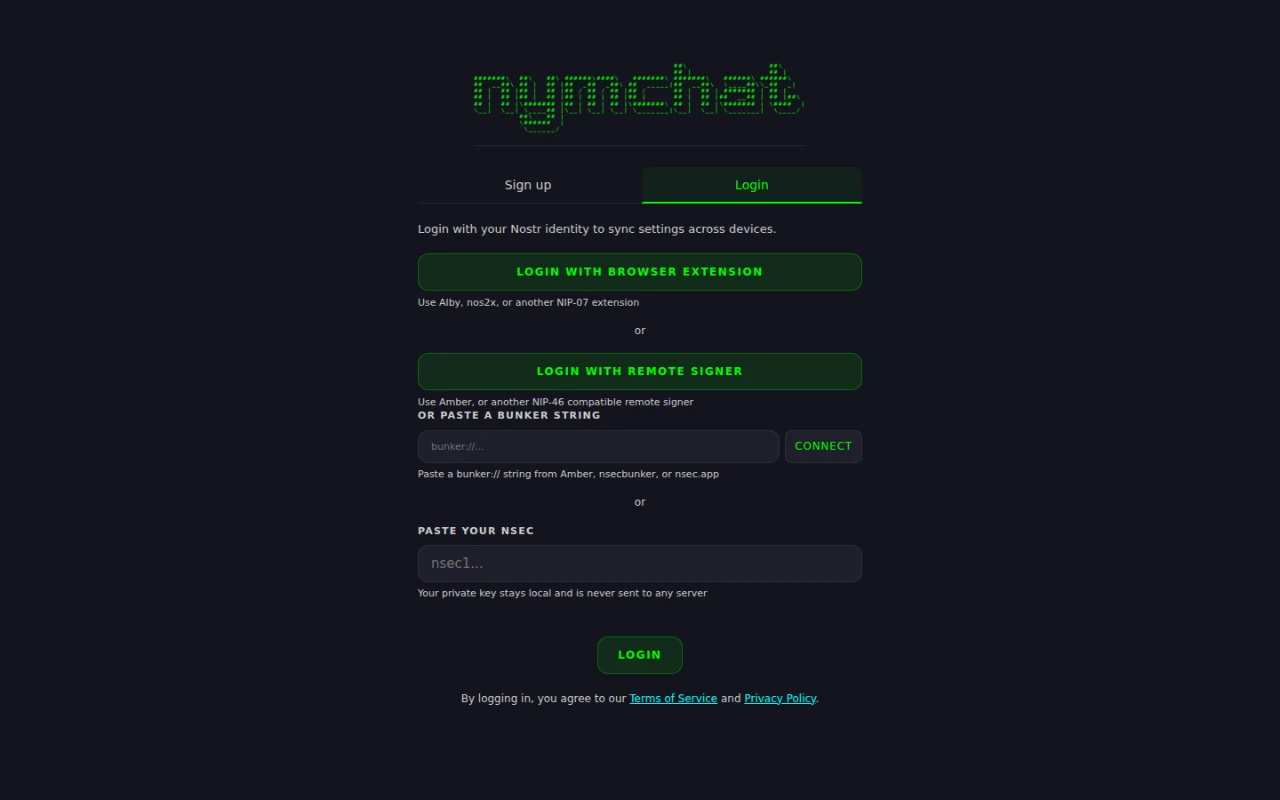
The Login tab takes an identity you already have. Four ways in, in descending order of how much your key is exposed:
| Method | Where the key lives | Needs |
|---|---|---|
| Browser extension (NIP-07) | In the extension. Nymchat asks it to sign and never sees the key. | Alby, nos2x or similar |
| Remote signer (NIP-46) | On another device or service. Signing requests go to it. | Amber, nsecbunker, nsec.app |
| Bunker string | Same as above — paste a bunker:// URI instead of scanning. |
A signer that emits one |
| Paste an nsec | In this browser's or app's local storage. | Nothing |
Above those four, Continue with Google and Continue with a passkey restore a key you backed up earlier — see Backing up your key. The restored key is then stored like a pasted one.
Prefer an extension or a remote signer where you can. If you paste an nsec, turn
on identity encryption so the stored key is
not readable from the device.
A persistent identity gets you a nym that survives restarts, a profile other clients can see, settings that follow you between devices, and zaps that can actually be paid to you.
More than one identity
One device can hold up to 10 identities and switch between them. Manage Identities, the row directly under the "Your Nym" panel, opens the list: each saved identity with its avatar, nym and how it signs in (nsec, extension, bunker, ephemeral or anonymous), a check on the active one, and a dot on any that have unread messages.
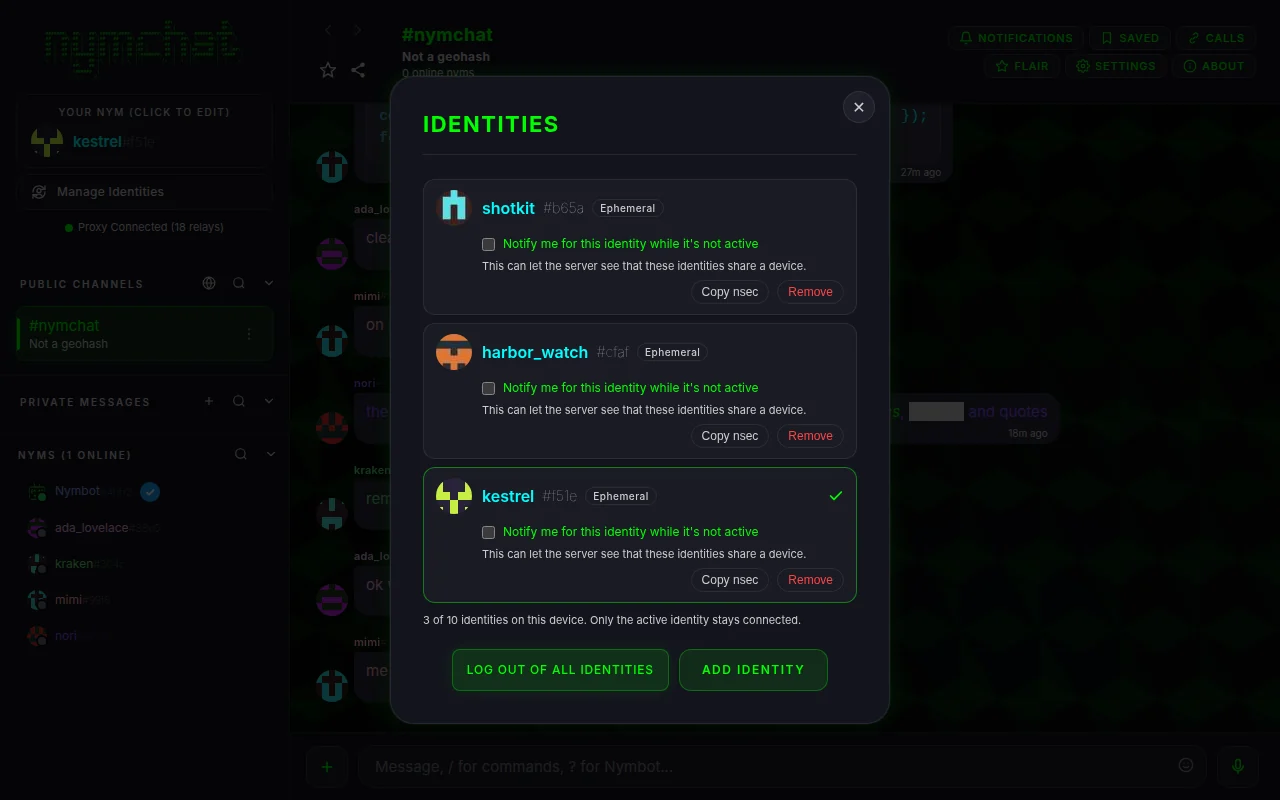
- Add identity opens the sign-up and login screen without logging the current identity out, so the new one joins the list.
- Tapping an identity switches to it. The app restarts as that identity with its own settings, chats, drafts and queued messages; anything still unsent stays with the identity that wrote it and is never signed by another one.
- Remove deletes that identity's messages, settings and caches from the
device. If its key exists only on the device, that is the end of it, so back up the
nsecfirst. A key held in an extension or a remote signer stays there. - Log out, in the nym details, logs out only the active identity and switches to the next one; Log out of all identities removes every one.
An identity protected by identity encryption stays encrypted while it is not in use. Switching to it brings up its unlock screen, and that screen's Forget identity deletes it from the device and moves you to the next identity, or to the welcome screen if it was the last.
Only the active identity is connected. The others keep no connection open and get no push notifications, because a device's push token shared between identities would show the server that they belong together. Notify me for this identity while it's not active turns that on for one identity, and says so. Each identity talks to relays and to the Nymchat server over its own connections, and no request carries two of them. What remains is what any app on one device shows: the same IP address, and switches that happen one after another. Use Tor or a VPN if that link matters.
Backing up your key
An nsec copied into a password manager is still the simplest backup. The app
can also keep one for you, from View or Edit Nym's Details, next to the
nsec and the post-quantum recovery code:
- Google. The key, and the recovery code with it, are encrypted on your device under a PIN you choose and stored in your Google Drive's hidden app folder. Google holds a copy it cannot read without the PIN. To restore, choose Continue with Google on another device and enter the PIN.
- Apple, in the iOS app, keeps the same PIN-encrypted copy in your iCloud Keychain.
- A passkey. The backup is encrypted under a secret only that passkey can produce, and stored under a separate key derived from the passkey rather than under your public key. Restore it with Continue with a passkey wherever that passkey is available.
A short PIN is the weak point of the first two, so the restore screen slows down repeated wrong guesses. A backup is only as private as the account it lives in is safe.
Your profile
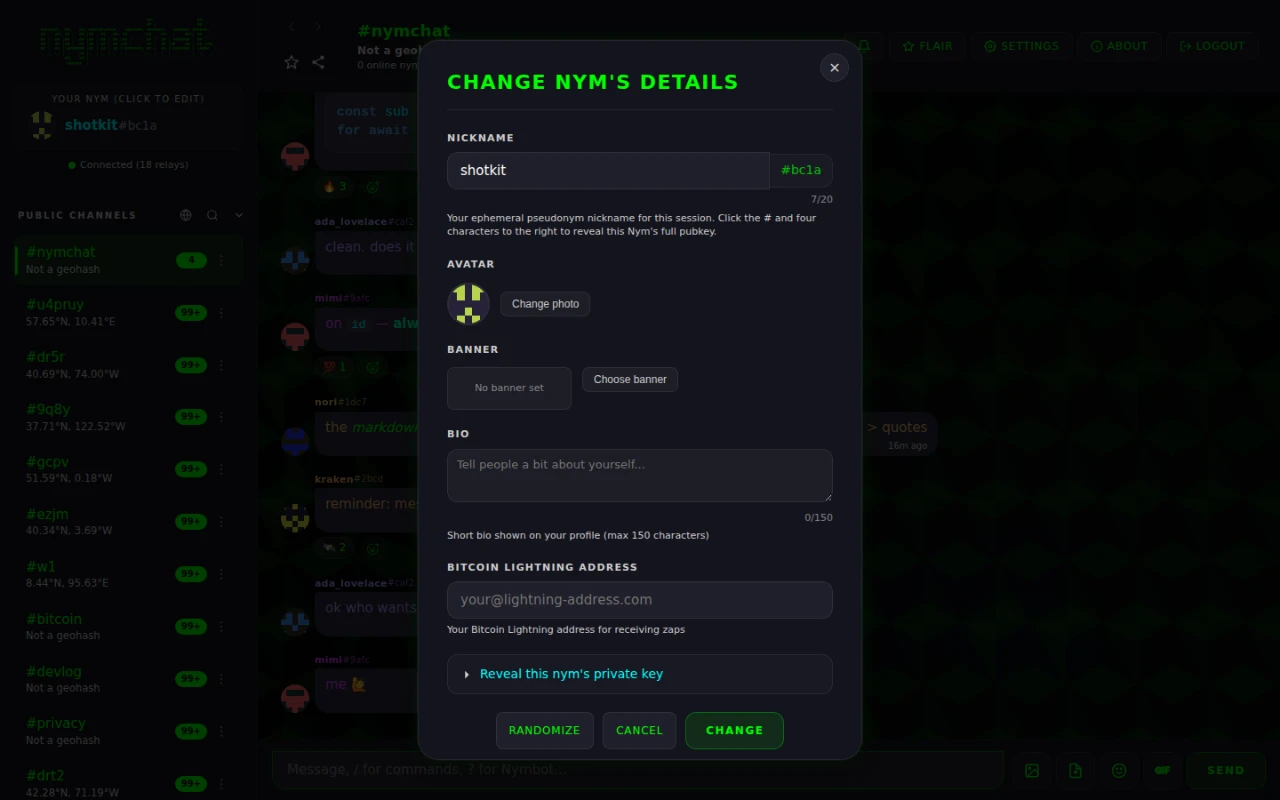
Tap the "Your Nym" panel at the top of the sidebar to open View or Edit Nym's
Details. It starts with your full public key, which you can copy as an
npub or in hex; the four characters after the # in your nym are the
last four of the hex. Below it you can edit:
- Nickname — up to 20 characters.
/nickdoes the same thing from the composer. - Avatar and banner images.
- Bio — up to 150 characters.
- Bitcoin Lightning address — where zaps you receive are paid.
- Reveal this nym's private key — a collapsed section that shows the
nsec, and thenympq1…post-quantum recovery code with it, so you can back them up. - Key Backup — see Backing up your key.
Log out is at the bottom of the same panel.
For a logged-in Nostr identity this is your ordinary Nostr profile (a kind 0
metadata event), so a change here shows up in every other Nostr client too.
Press and hold that same panel for two seconds and Nymchat wipes itself from the device immediately, without asking — every saved identity, not only the active one. See Panic wipe.